NLE stands for Non-Linear Editor. It’s the software video editors use to cut, arrange, and finish video projects — and understanding what the term actually means helps you understand how modern editing works at a fundamental level.
This guide explains what an NLE is, why the “non-linear” part matters, how NLEs differ from each other, and what to look for when choosing one.
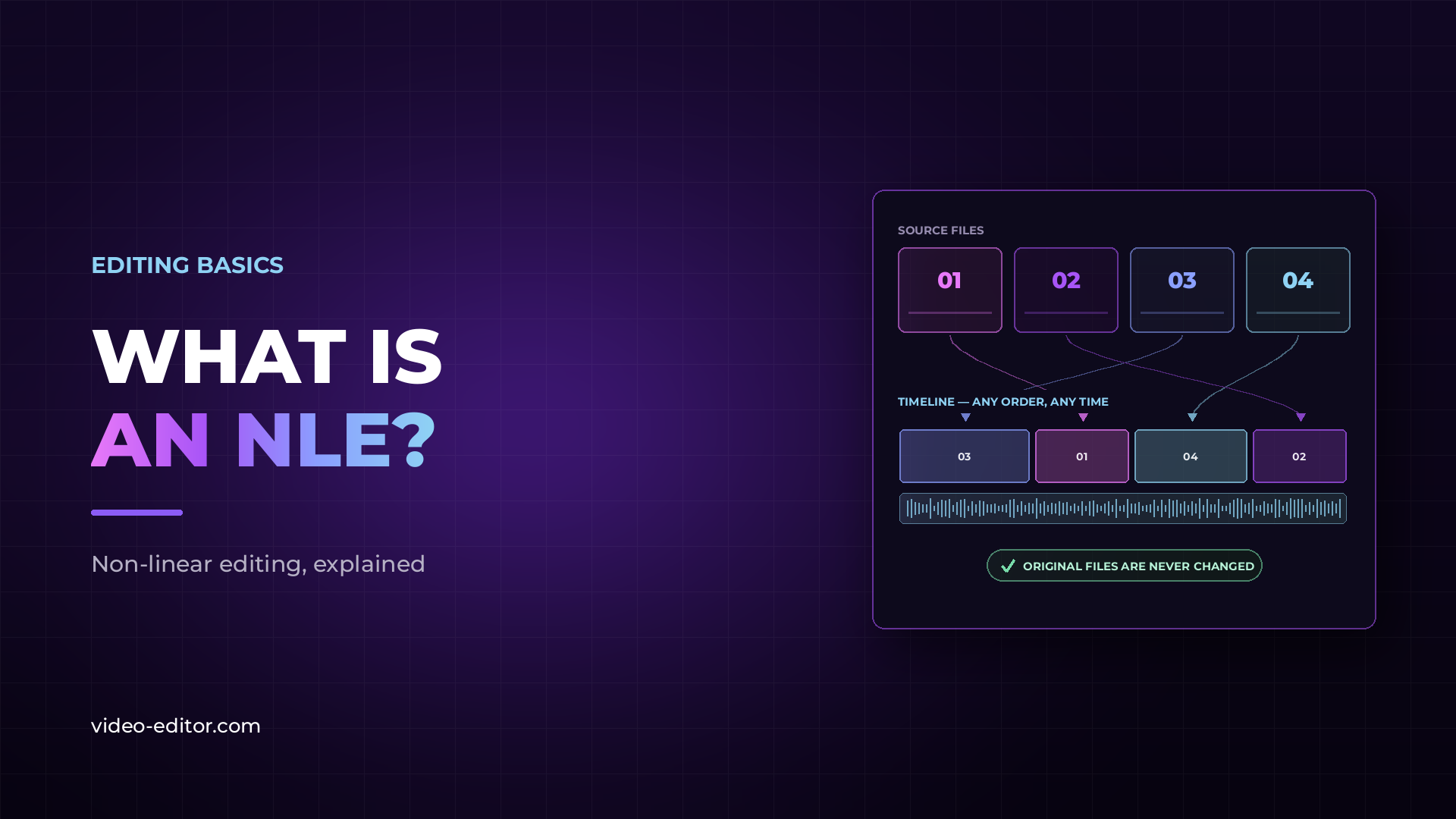
An NLE — Non-Linear Editor — is software that lets you edit video by working with digital copies of your footage on a timeline, without modifying the original files. You arrange clips, make cuts, add transitions, adjust audio, and apply color grades — all non-destructively, meaning the source files are never touched.
The “non-linear” part refers to the ability to jump to any point in your project at any time, cut in any order, and rearrange clips freely. This is the standard way all modern editing software works.
To understand why non-linear editing was significant, you have to understand what came before it.
Linear editing — the standard method before digital NLEs existed — meant working with physical tape. To assemble an edit, you would copy footage from a source tape to a master tape in the exact order it would appear in the finished program. If you wanted to change something early in the edit, you had to redo everything that came after it. The process was sequential, time-consuming, and difficult to revise.
Non-linear editing changed this entirely. Because digital NLEs work with files rather than physical tape, you can cut, rearrange, and revise any part of a project at any time without affecting anything else. An edit that would have taken days on tape can be done in hours. Revisions that once required starting over now take minutes.
Every major editing software today is non-linear. The term is now largely interchangeable with “video editing software” at a professional level.
When you import footage into an NLE, the software creates references to your source files — it doesn’t copy or alter them. Everything you do on the timeline — cuts, transitions, effects, color grades — is stored as a set of instructions that the NLE follows when it renders or exports the project.
This is called non-destructive editing. Your original files remain unchanged regardless of what you do in the edit. You can undo any change, try multiple versions of the same sequence, and always go back to the original footage.
The core components of any NLE are the same across all platforms: a media bin (where imported clips are organized), a timeline (where the edit is assembled), a viewer or program monitor (where you preview the edit), and an export function (where you render the finished file).
Most professional NLEs also include built-in color tools, audio mixing, titling, and varying degrees of visual effects capability. Some, like DaVinci Resolve, integrate a full professional audio suite and compositing environment into the same application.
There are several professional NLEs in active use. Each has a different history, strengths, and primary user base.
Developed by Blackmagic Design, DaVinci Resolve started as a dedicated color grading tool and expanded into a full NLE. It’s now used at the highest levels of film and television post-production. The free version is fully professional — no watermarks, no export limits. Resolve is widely considered to have the best color tools of any NLE.
Adobe Premiere is one of the most widely used NLEs in broadcast and commercial production. It integrates tightly with After Effects, Audition, and Photoshop — a strong choice for editors who work across the Adobe ecosystem. It requires a Creative Cloud subscription.
Apple’s professional NLE, available only on Mac. It uses a magnetic timeline rather than a traditional track-based approach, which some editors find faster. It’s a one-time purchase and widely used in independent film and YouTube production.
The standard in long-form broadcast and film editing — scripted television, feature films, news. It has the steepest learning curve of any major NLE but the most robust media management and collaboration tools.
For a detailed comparison of the two most common NLEs for independent and commercial work, the DaVinci Resolve vs Adobe Premiere breakdown covers every major difference.
The right NLE depends on what you’re editing, who you’re working with, and what your budget is.
If you’re starting out and want to learn on professional tools without paying for software, DaVinci Resolve is the clear recommendation. The free version is complete, it’s used in professional production worldwide, and learning it means learning the real thing.
If you work heavily within the Adobe ecosystem — After Effects for motion graphics, Audition for audio — Premiere integrates with all of them and may be worth the subscription cost.
If you’re on Mac and do a lot of independent or YouTube work, Final Cut Pro is fast, stable, and well-supported.
If you’re working in broadcast or long-form television, Avid may be required regardless of personal preference — it’s still the facility standard in many environments.
Whichever NLE you choose, AI tools are increasingly built into the workflow — from auto-captions to silence removal to multicam switching. Here’s a breakdown of the best AI tools available inside and alongside every major NLE.
NLE stands for Non-Linear Editor. It refers to any software that allows video editing on a digital timeline, where clips can be arranged, cut, and rearranged freely without modifying source files.
In practice, the terms are interchangeable. All modern professional video editing software is non-linear. “NLE” is the technical term used in professional and broadcast contexts; “video editing software” is the more general term for the same category.
Yes. DaVinci Resolve is a professional NLE with an integrated color grading suite, audio workstation (Fairlight), and compositing environment (Fusion). The free version is fully professional.
It depends on the type of work. Broadcast and film: Avid Media Composer. Commercial and independent production: Adobe Premiere or DaVinci Resolve. Mac-based independent work: Final Cut Pro. All four are used professionally — there’s no single standard across all categories.
It depends on the resolution and codec of your footage. 1080p H.264 runs on most modern computers. 4K RAW requires a more capable machine, particularly a fast GPU and sufficient RAM. A proxy workflow lets you edit high-resolution footage on less powerful hardware. Here’s how the proxy workflow works in practice.
Non-destructive editing means all changes made in an NLE are stored as instructions, not applied to source files. Your original footage is never modified. You can undo any change at any time and always return to the original clip.
Want more practical guides for working video editors? Browse the full blog.
 u
u