
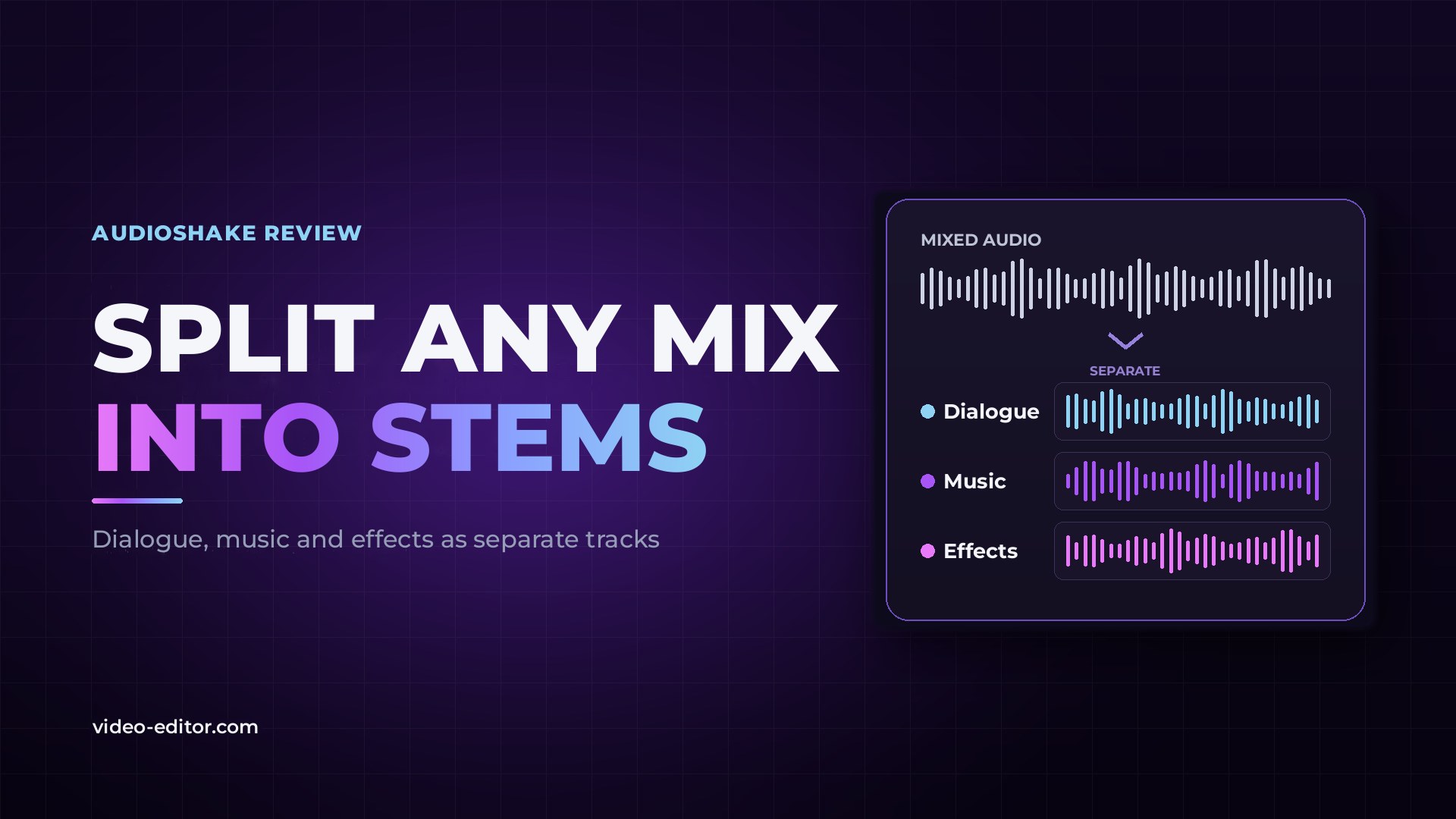
Every editor knows the moment a project's audio starts working against them. The interview arrives as a single finished mix, with music running under every answer. The guest who kept talking over the host is now locked into one track with him. The best clip of the shoot can't go online because a song was playing in the background. And the original stems are long gone, if they ever existed.
These are some of the most common audio problems in editing, and the usual fixes don't solve them. EQ and noise reduction thin out the voice and still leave the music behind. Ducking only makes the problem quieter. Asking for a re-record is rarely an option.
What actually solves them is stem separation: rebuilding each element of a mixed recording as its own track. That is exactly what AudioShake does, and few companies in the field have earned more recognition for it. We tested it in AudioShake Studio on demanding music tracks and on the dialogue and multi-speaker examples built into the app.
It also isn't one of the AI tools that appeared after the chatbot boom. AudioShake won Sony's first Music Demixing Challenge in 2021, more than a year before ChatGPT launched, and its separation is used by major labels, film studios and broadcasters.
AI stem separation takes a single mixed recording and splits it into its components, called stems. A model trained on how voices, instruments and sounds behave identifies each element and rebuilds it as a separate track.
This is different from noise reduction. Noise reduction only removes what it considers unwanted. Separation keeps every part and hands each one back to you, so you decide what stays, what goes and how loud each element sits in the mix.
For video work, the stems that matter most are:
AudioShake Studio runs in the browser, with nothing to install. A job takes a few clicks from upload to finished stems.
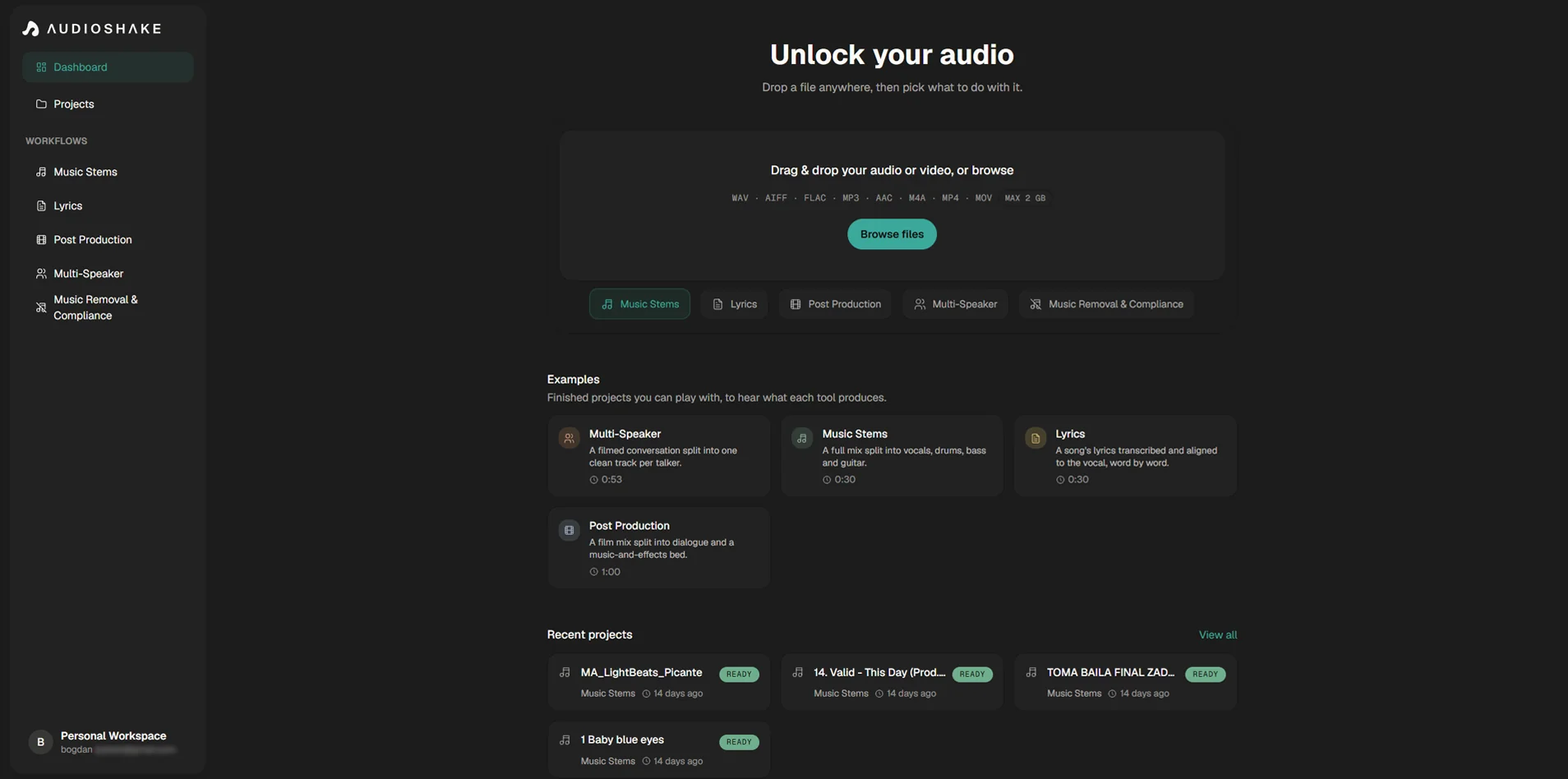
Because the output is a set of standard audio files, it fits any timeline: Adobe Premiere, DaVinci Resolve, Final Cut Pro or a DAW. For teams processing large volumes, the same models are also available through the AudioShake API.
Dialogue, Music & Effects Separation splits a finished soundtrack into three stems: dialogue, music and effects. It works on fully mixed audio, including the audio track of a finished video.
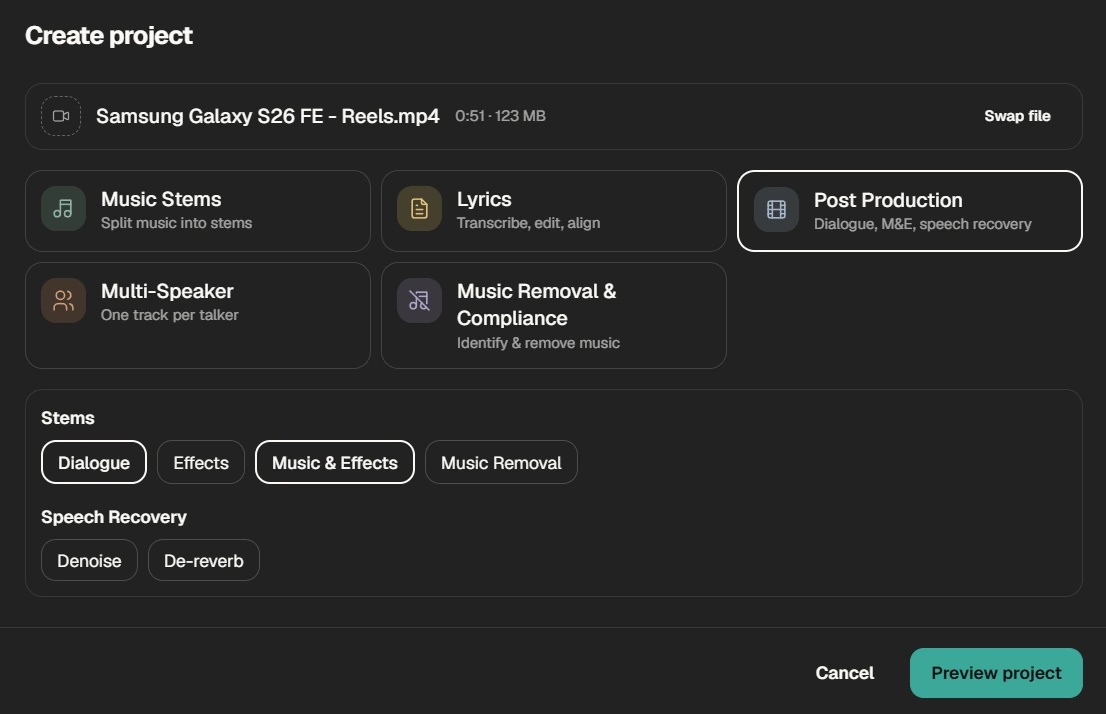
The same panel also includes Speech Recovery, with Denoise and De-reverb, which clean background noise and room echo out of the dialogue itself.
We ran the built-in example project in Studio, and the separation was better than we expected.
Where it earns its place is the job that usually ends in a compromise. A client delivers only the final mix and wants a new cut with different music. A documentary needs an interview clip from a program with a score running under it. A localized version needs a clean music and effects (M&E) track, and the original session is gone. The dialogue stem gives you the voice to work with, and the music and effects stem keeps the original sound design intact.
It is built for editors re-cutting archive or client material and for post-production teams preparing versions for other markets. It is just as useful for creators turning a finished video into new edits.
AudioShake's copyright tools find every stretch of music in a file, identify it, and remove it from the mix while the dialogue and background sound stay in place.
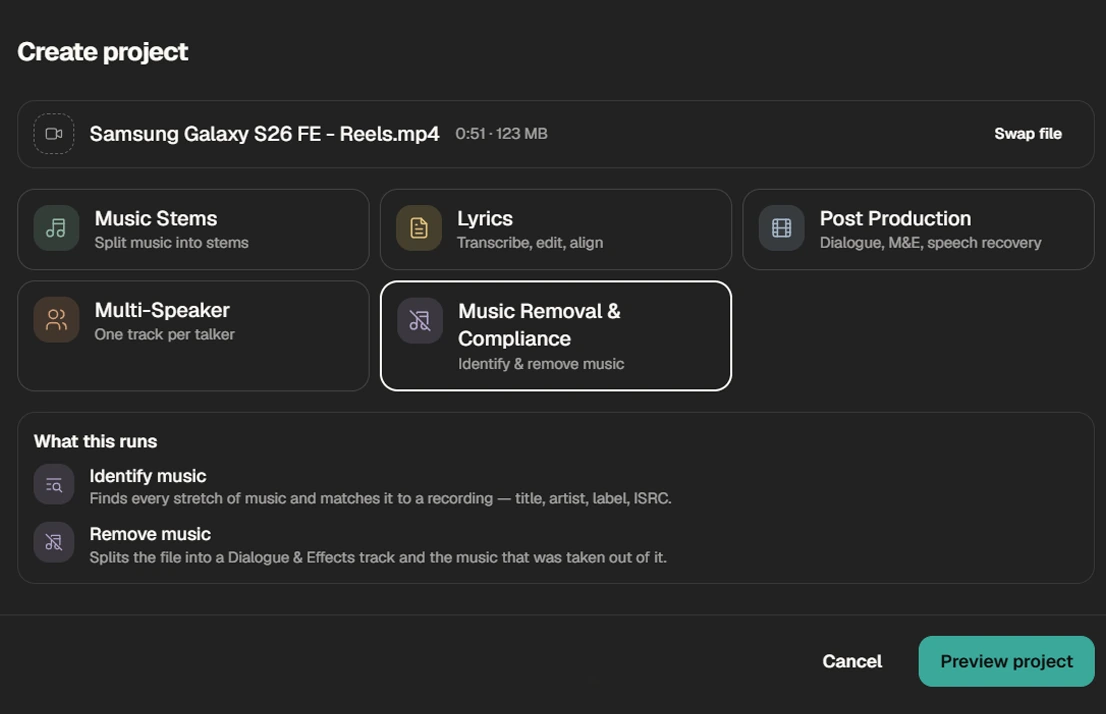
For creators, this is the capability that matters most. A vlog shot in a café, an event with a DJ, a street interview, a stream with music playing in the room: any of them can run into a copyright claim because of a song in the background. Instead of muting the clip or re-shooting it, you remove only the music and lay licensed music of your own under the original dialogue and sound.
Detection is just as useful on long material. Before you upload an hour-long stream or prepare archive footage for a new platform, it shows exactly where music appears, so you know which passages need attention. Broadcast and archive teams use the same workflow to re-release programs whose music licenses have expired.
One thing to keep clear: removing the music doesn't grant you any rights. Licensing remains the creator's responsibility, and each platform applies its own detection rules.
Multi-Speaker Separation takes a recording with several people talking and returns a separate, clean track for each voice, including the moments when they speak at the same time.
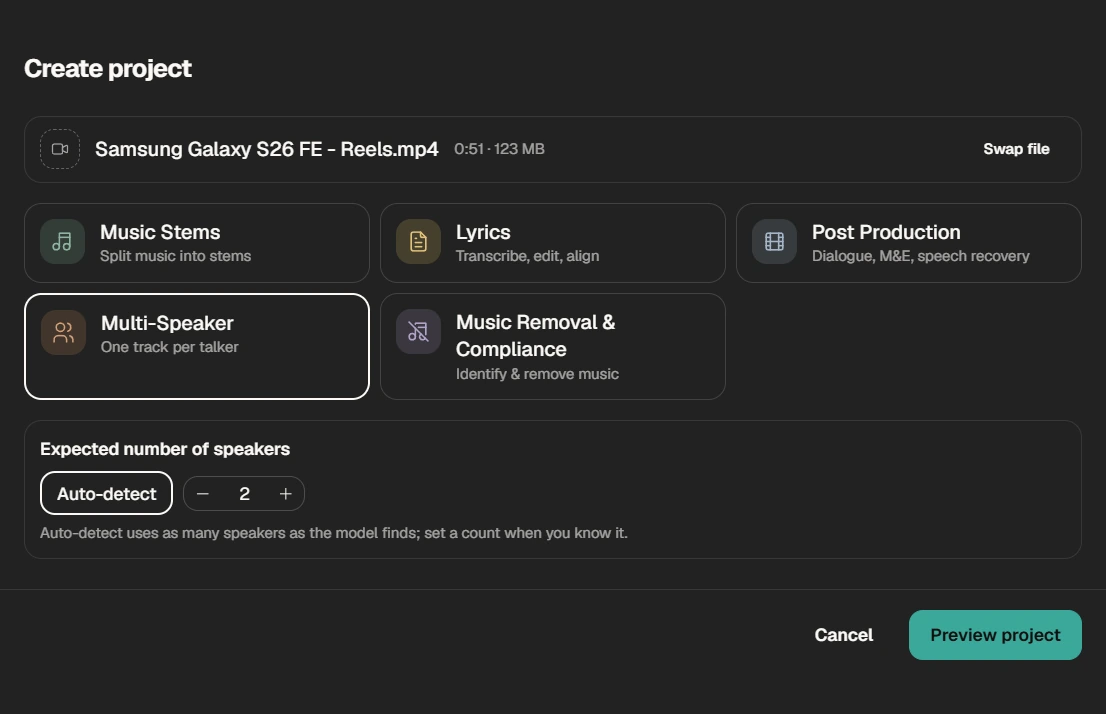
Before processing, you can let Studio detect the number of speakers automatically, or set the count yourself when you know it.
Alongside the audio, every job returns a timeline of who spoke when, plus confidence scores. Those scores show exactly which passages were difficult, so you check only the moments that need your ears instead of listening to the whole file.
For podcast and interview editors, this changes how crosstalk gets handled. A podcast recorded on one microphone, guests whose mics bleed into each other, an interviewer who talks over the key line: with each voice on its own track, you can level one guest without touching the others, cut an interruption or clean a single voice in a busy room. It works on single-track recordings, not only on multi-mic setups.
The same applies to panels, roundtables and documentary scenes where several people talk at once and the recording was never split.
The model is acoustic rather than language-based, so it works on how voices sound, not on what they say. AudioShake states that accuracy holds up to roughly 20% sustained overlap, which covers normal conversation with interruptions.
Vocal & Instrument Stem Separation splits a finished song into its parts. Studio offers ready presets, such as vocals and instrumental, or vocals, bass, drums and other. A custom setup goes further: lead and backing vocals separately, electric and acoustic guitar, keys and piano, strings and wind instruments.
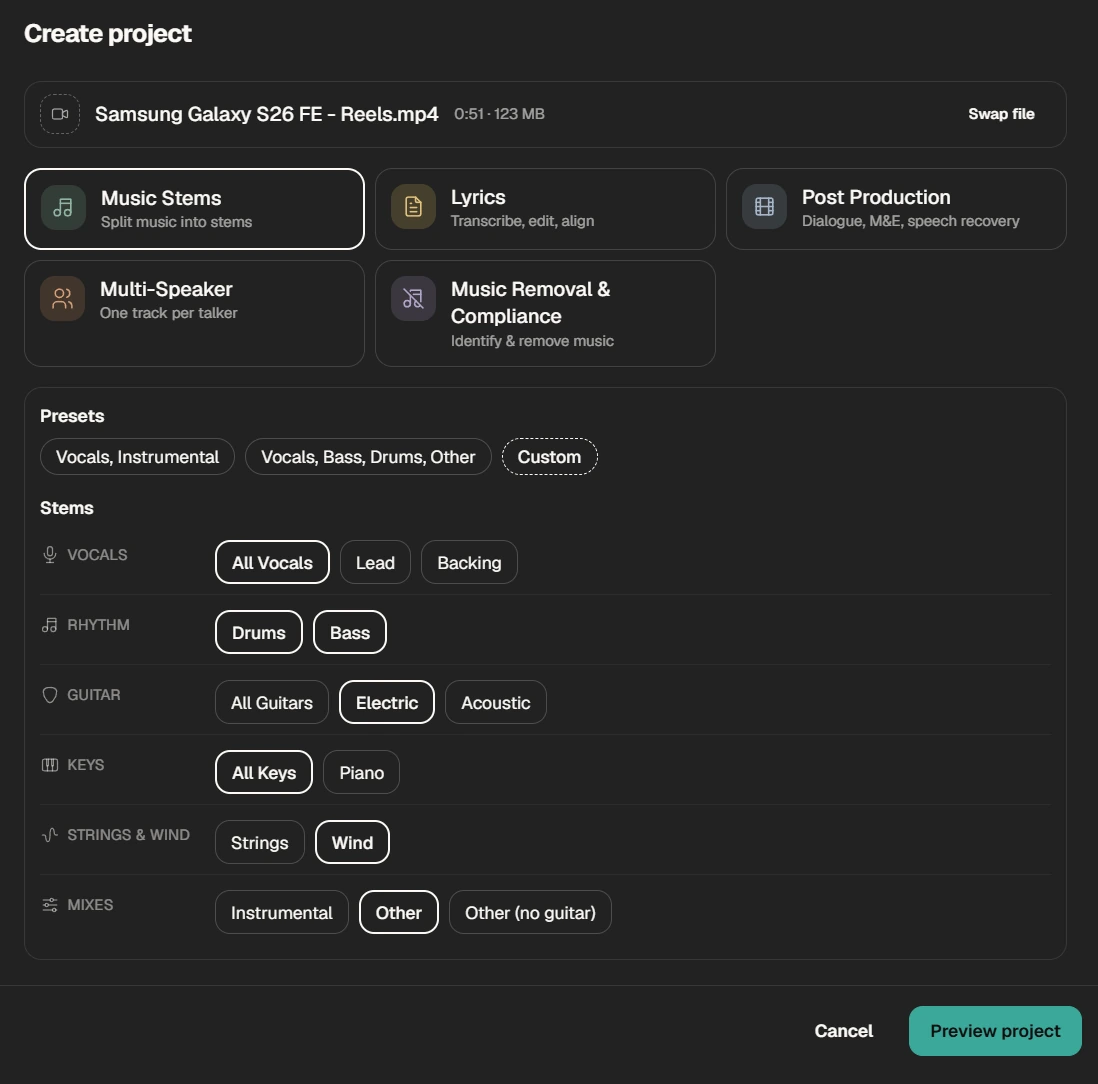
We tested it on our own demanding material: rockabilly, hip-hop and electronic tracks. Vocals came away cleanly from the instrumental, instrument detection was accurate, and even in the harder passages it pulled the backing vocals apart from the lead vocal and the music. The interface lays the stems out as channel tracks, which feels familiar to anyone who works in an editing or audio program. The video below uses the example project built into Studio rather than our test tracks, since those are commercial releases we don't have the rights to publish.
For music video and concert editors, a stereo master is no longer the end of the line. If the edit needs the drums louder in one section, an instrumental under a voiceover or a vocal brought forward in a live recording, you can do it in the edit instead of asking the band for a new mix. And if you cut to the beat, the drum pattern sits on its own track to cut against.
| Specification | Details |
|---|---|
| Audio input | WAV, AIFF, FLAC, MP3, AAC, M4A |
| Video input | MP4, MOV (only the audio stream is processed) |
| Audio output | WAV, MP3, FLAC, AIFF |
| Video output | MP4 with the separated audio in the original container |
| Sample rate | Up to 192 kHz |
| Not supported | 5.1 and other surround formats, DRM-protected files |
Studio accepts files up to 2 GB. For the best results, AudioShake recommends 16-bit or 24-bit WAV as the source.
Pricing is credit-based. Credits are charged per minute of source audio and per stem you request, so a job that creates three stems costs more than a job that creates one. Studio has a free plan to start, which is enough to test the tool on your own material. Paid plans add more monthly credits, lossless export formats and support for longer files. Current plans are listed in AudioShake Studio.
Adobe Premiere and DaVinci Resolve now include AI dialogue tools, and they are useful for quick cleanup inside the timeline. But in an editing program, separation is one feature among hundreds, and in Premiere it is still in beta. For AudioShake, separation is the whole product. It is a dedicated platform built by a team that won Sony's separation challenges in 2021 and 2023, and that focus shows in how far it goes.
What AudioShake adds that a timeline tool is not built for:
A few limits to know before you start. Surround mixes are not supported. And credits scale with the number of stems, so plan which stems you actually need. As with any separation, the result is the start of the mix, not the finished mix.
Who it is for: editors who regularly receive finished mixes instead of stems, podcast and interview editors dealing with crosstalk, music video and post-production teams that need detailed, reusable stems, and anyone who has to remove copyrighted music before publishing. That last group includes journalists reporting from trade shows and events, and YouTubers filming at events or in public spaces where music plays in the background.
AudioShake was founded in San Francisco in 2020 by Jessica Powell, a former Google vice president of communications, and Luke Miner, a data scientist. The idea goes back to 2013, when the two of them sang karaoke in Tokyo and wondered why every song in the world couldn't be turned into a backing track.
The company built its reputation on research results, not on a product launch:
Its customers include Universal Music Group, Warner Music Group, Disney Music Group, Warner Bros., ESPN and the post-production company Deluxe. Stems from AudioShake have been used to create Dolby Atmos mixes of recordings by the Jackson 5, Nina Simone and Whitney Houston. The tool is the same one those teams use, now available to individual editors through AudioShake Studio.
AudioShake delivers on what it promises. On demanding music, the separation was better than we expected, and each of the four capabilities covered here solves a problem that used to end in a compromise or a re-record. Behind it is a team with a research record few audio AI companies can match. If you regularly receive finished mixes instead of stems, it is worth testing on your own material with the free plan.
Upload the video to AudioShake Studio, choose a Post Production project and select the dialogue stem. Studio processes the audio track and returns dialogue, music and effects as separate files you can import into your editing program.
Yes, Music Removal removes the background music and keeps the speech and effects. Removing the music doesn't grant any rights, though. Licensing remains your responsibility, and each platform applies its own detection rules.
Yes. Multi-Speaker Separation returns a clean track for each speaker, including the overlapping moments, with a timeline of who spoke when. AudioShake states that accuracy holds up to about 20% sustained overlap.
Yes. It accepts MP4 and MOV and processes only the audio stream. You can export the stems as audio files or as an MP4 with the separated audio.
Yes. The stems are standard audio files, so they import into Adobe Premiere, DaVinci Resolve, Final Cut Pro or any DAW.
An M&E track contains the music and effects of a program without the dialogue. Dubbing teams use it to record a new language over the original sound design. AudioShake creates it from a finished mix when the original stems are missing.
Studio has a free plan to start. Paid plans add more monthly credits, lossless export and longer files.
No. Surround formats such as 5.1 are not supported. Use a stereo or mono source.
 u
u