KlikSync is a one-click multicam audio synchronization tool for video editors. Import your XML timeline, click Synchronize, and get perfectly synced clips in minutes — no manual alignment needed.
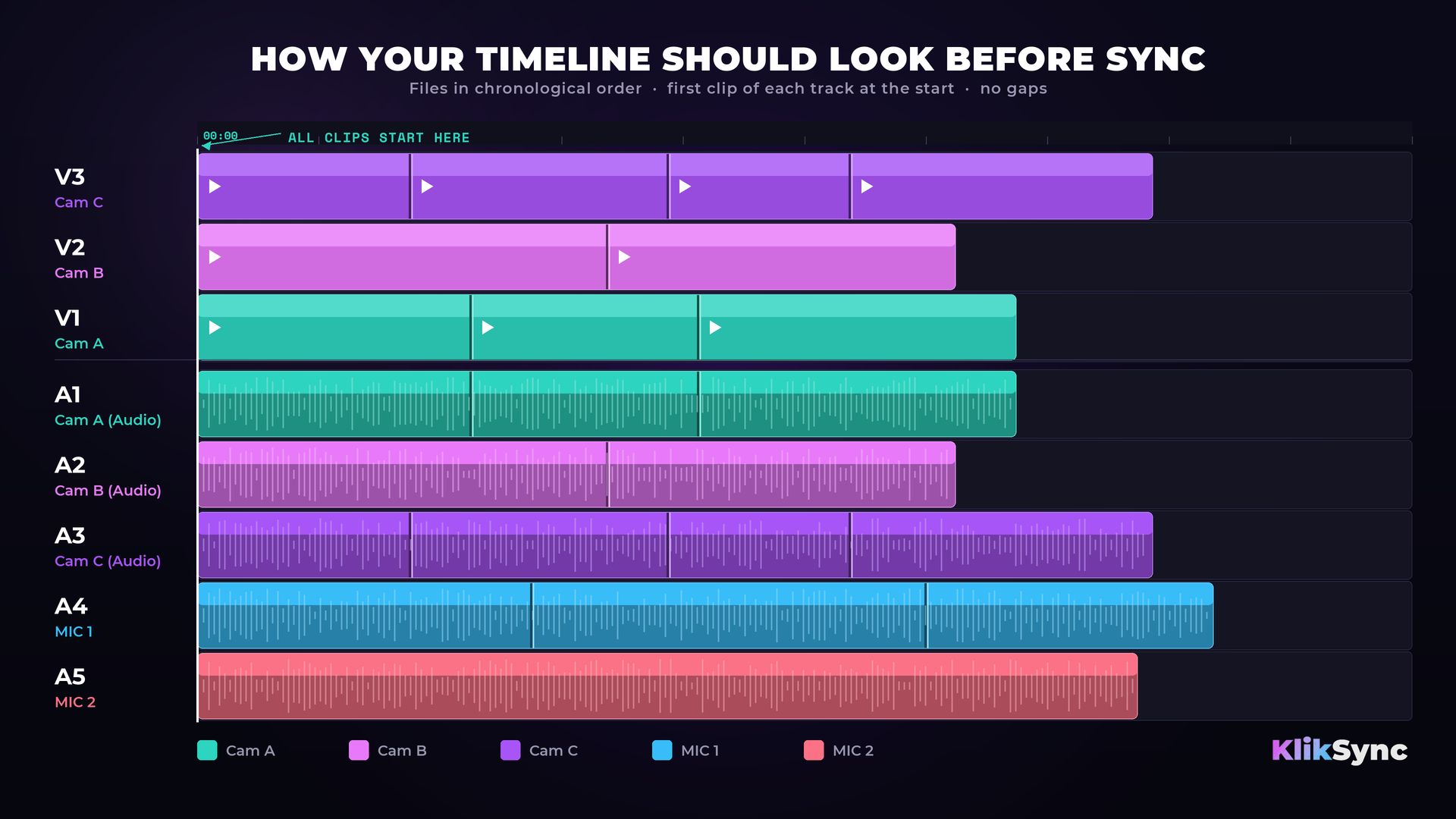
Before exporting XML, organize your timeline following this rule:
One source = one track, with clips in chronological order within each track.
Each camera's video and audio must be on matching track numbers:
Audio-only sources (standalone microphones, recorders) go on the lowest available audio tracks, below all video-paired audio tracks:
Do not mix different sources on the same track.
Don't trim clips before syncing. On each track, the first clip must start at the very beginning of the timeline, with the following clips placed back-to-back after it — no gaps. Every clip stays at its full original duration. Trimming or leaving gaps will cause incorrect results.
Adobe Premiere: File → Export → Final Cut Pro XML
DaVinci Resolve: File → Export AAF, EDL, XML → Final Cut Pro XML
Adobe Premiere: File → Import → select synced XML
DaVinci Resolve: File → Import AAF, EDL, XML → select synced XML
Your clips are now perfectly synced.
In this video: 100+ files from a real multicam shoot — multiple cameras, multiple playback tracks, no timecode. Every file synced automatically, in one click.
MP4, MOV, MKV, AVI, MXF, MTS, M2TS, TS, CRM, R3D.
WAV, BWF, AIFF, MP3, AAC, M4A, FLAC, OGG, AC3
Final Cut Pro XML (exported from Adobe Premiere or DaVinci Resolve)
- macOS 12 (Monterey) or later
- Apple Silicon (M1, M2, M3, M4, or newer) — Intel Macs are not supported
- Minimum 8 GB RAM (16 GB or more recommended for large projects)
- Windows 10 or Windows 11 (64-bit)
- Minimum 8 GB RAM (16 GB or more recommended for large projects)
- Multi-core CPU (more cores = faster sync)
KlikSync is a one-time purchase. Your license is permanent — once you buy it, you own it forever.
All future updates are free. New versions will be published on this page — simply download and install the latest version at any time.
We are committed to maintaining and improving KlikSync. However, we reserve the right to discontinue development at any time, with no obligation to provide further updates or support.
Already own KlikSync? All updates are free. Just log in with the email you purchased with to access your account and download the latest version.
Log in to get the latest version →
New here? Get KlikSync →
If KlikSync fails to correctly sync footage that's prepared as described in this documentation and we can't resolve it, you're entitled to a full refund within 7 days of purchase. Read the full refund policy. Questions? Contact us.
How many clips can KlikSync sync at once?
There is no hard limit. KlikSync is designed to handle large multicam projects. Performance scales with available CPU and RAM.
Does KlikSync work with proxy files?
Yes. KlikSync reads audio from whichever files are referenced in your XML — including proxy files.
Does KlikSync support RED camera footage?
Yes. R3D files from RED cameras are fully supported.
My clips didn't sync correctly. What should I check?
Make sure each source is on its own dedicated track and clips are in chronological order. Mixing sources on the same track is the most common cause of incorrect sync. On each track, the first clip must start at the very beginning of the timeline, with the following clips back-to-back and no gaps. Don't trim clips before syncing — every clip stays at its full original duration.
Does KlikSync modify my original files?
No. KlikSync only modifies the XML file. Your original media files are never touched.
Which NLEs are supported?
Adobe Premiere and DaVinci Resolve. Any NLE that supports Final Cut Pro XML import/export should work.
Release Date: July 2026
Available for Windows and macOS
Improved Synchronization
Release Date: June 2026
Improved Synchronization Accuracy
Improved Project Compatibility
Performance
Release Date: May 2026
Email: office@video-editor.com
Website: https://www.video-editor.com/kliksync
© 2026 Video Editor. All rights reserved.



