
If you work in video production and have ever searched for NAS storage advice online, there's a good chance you've already come across the name Bob Zelin — even if you didn't know it at the time.
Bob has been in professional video engineering since 1978, making him one of the most experienced voices in the industry. Through his company Rescue 1, Inc., based in Florida, he has designed and installed shared NAS storage systems for hundreds of clients — across 33 US states and 28 countries and territories worldwide, including Disney, Universal Studios, Google, and American Zoetrope, the production company of Francis Ford Coppola.
But the client list tells only part of the story.
For years, Bob has been one of the most active and trusted voices in professional video communities online. He's a regular contributor on Creative COW — one of the largest and longest-running forums for video production professionals — as well as the QNAP Community Forum, the Blackmagic Forum, and Reddit, where editors and technicians regularly seek his advice before making a purchase decision. On all of these platforms, his approach is the same: direct, practical guidance rooted in hundreds of real-world installations, with no theorizing.
We asked him to share his knowledge with the readers of video-editor.com. What follows is a conversation about NAS systems and everything they can offer video editors — from solo freelancers working from home to multi-user post-production studios.
My first experience with a NAS system was completely unplanned.
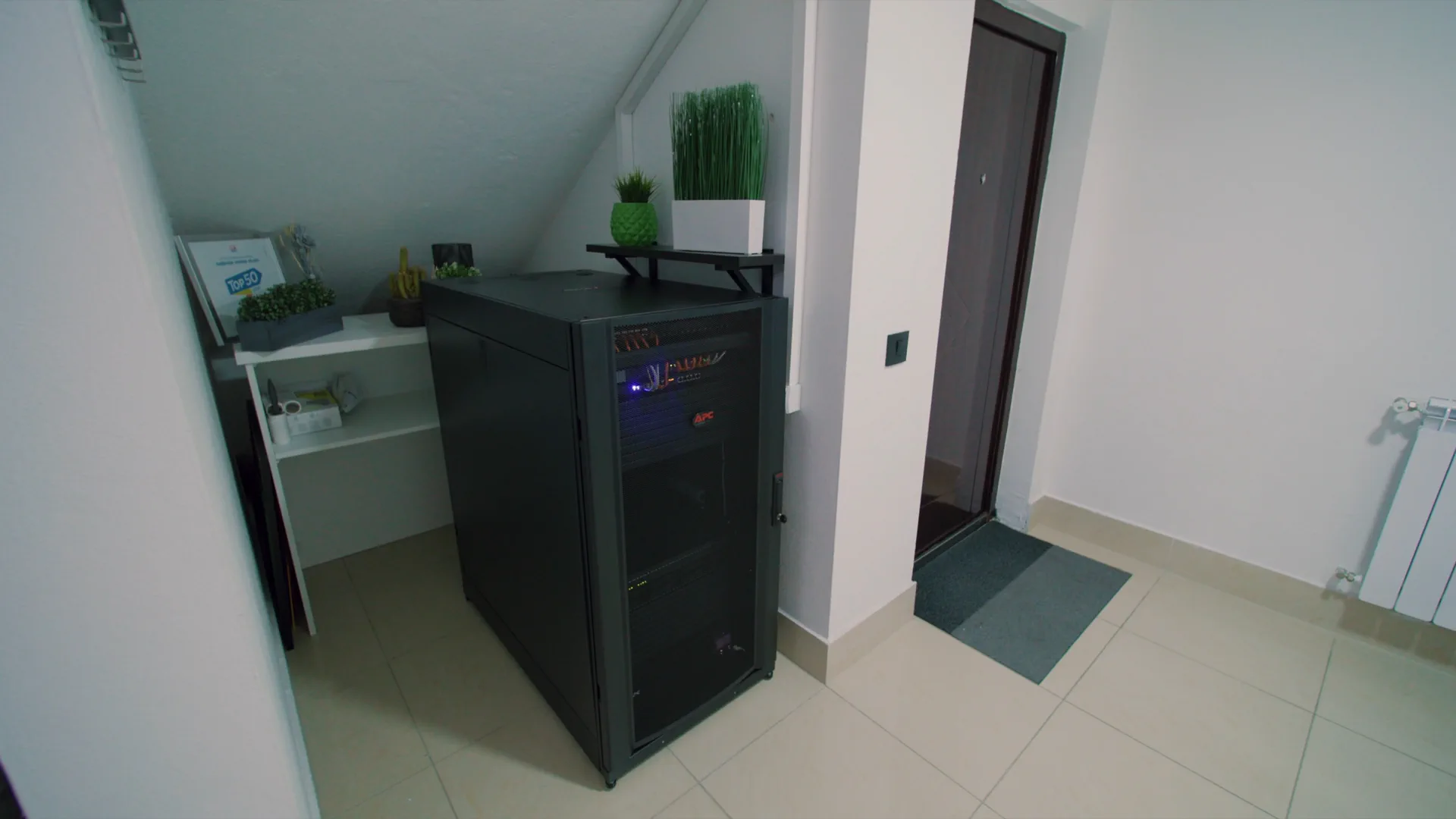
I was working as a video editor at a company that, among other things, collaborated with tech companies and produced video reviews of their products. One day, one of those companies was clearing out their warehouse and sent us a rack enclosure — nobody asked for it, nobody had any idea it would ever be useful. It sat in the corner for a while and nobody paid any attention to it.
About six or seven months later, that same rack was at the center of our entire workflow. Inside it sat a Synology DS1221+ with a 10G network and 40TB of capacity — and suddenly everything worked differently. Me as the editor, the cinematographer, journalists, and colleagues working on the company's social media from home — we were all accessing the same 4K files from different locations, with no waiting, no swapping hard drives, no "send me the file."
Until that point, I hadn't fully understood what a NAS system could actually do for a production team. After that experience, I could no longer imagine a serious workflow without one.
Years later, I still see editors and other creatives struggling with external hard drives. A pile of drives on the desk, cables everywhere, handwritten labels telling them which project is where. One drive for client A, another for client B, a third labeled "backup — April" — and nobody is quite sure which one is the latest.
That's exactly why I wanted to talk to Bob. A direct, honest conversation about what a NAS system can actually do for a video editor, who needs what kind of system, and what it realistically costs.
Bob, I know you like concrete cases and real situations, and that you form your opinions based on those specifics. However, there are endless variations, needs, and possibilities when it comes to NAS systems — so I think it makes more sense to cover a broader range of scenarios, from the solo editor working from home to small and mid-sized teams.
I was first involved with audio production, and then video production. Large companies in NY City were doing both production and post production. When I went freelance, most of the people that wanted to hire me were involved with post production. My first exposure to shared storage was with AVID. I had become the AVID guy in New York City, and these were not NAS systems - they were SAN's (storage area network) using Fiber Channel. These were expensive and complicated. I never paid attention to any other manufacturer other than AVID while I was in New York.
Upon moving to Florida in 1999, most people could not afford a shared storage system. In 2009, I heard about Tiger Technologies MetaLAN, which would allow me to build my own shared storage system using a Mac Pro computer and a large RAID array. So that was my first NAS system. This quickly evolved to simply using Apple Server Software, using the same Apple Hardware. All of this changed when Apple decided to get out of the shared storage business, and stopped selling their Server software, and the XSAN product line.
A network attached storage system will allow multiple editors and graphics artists to access the same media, at the same time. This make working in collaboration very easy, without having to have copies of video media transfered from computer to computer. As modern NAS products developed, remote access of these shared storage products became available, making it easy for remote editors and graphics artists to be able to work on the footage on this shared storage system. Additional features, like backing up to cloud sites, or a remote NAS for backup, also became available.
When using 10G Ethernet, you can edit directly from a NAS system. Most modern NAS systems have built in 10G ethernet ports, and if there are enough drives in the NAS system, that will provide enough total aggregate bandwidth for multiple users, then even working in full res 4K media will be able to be edited directly off of a single NAS system.
I typically say that 2 users can use a 6 drive NAS, 3 to 4 editors can use an 8 drive NAS, and 5 - 6 editors can use a 12 drive NAS system - provided they all have 10G ethernet connections, via a small 10G ethernet switch connected to the NAS. Of course, when working with very low resolution proxy footage, you can get away with less drives, or even a 1G ethernet connection. It all depends on the compression codec.
This is a difficult question to answer. If you are a single editor, and you just want to work locally, and you only have one computer, there is no reason to go thru the complexity of setting up a NAS storage system. But if you are a single editor that is using multiple computers, or if you are a single editor that wants remote access to your footage when you are away from your system - or you are a single editor that wants to do cloud backups, or backup to a second off site NAS system - then it makes sense. But if you are a solo editor, just working locally with your single computer - I could never recommend going with a NAS system, as you would have a much better experience with a simple direct attached storage thunderbolt RAID array.
Using a NAS is for editors that have multiple computers, or have multiple editors that need to collaborate on the same footage at the same time. There are modern cloud solutions like Lucid Link, Suite Studios, and Shade, Inc. that allow for real time cloud editing, but are expensive. Normal cloud sites, like Dropbox or Google Drive are simply not fast enough to edit from. This requires uploading and downloading the footage to a local drive. External drives are great for a single editor with a single computer.
A 1G network is 100 MB/sec. A 10G network is 1000 MB/sec. Unless you are doing low res proxy editing, a 1G network is simply not fast enough to edit professional 4K full res video media. This is why every professional system uses 10G ethernet, or faster. Today, even 25G ethernet and recently 100G ethernet has become available. But for the bulk of the work, 10G connections to a local computer on the network is more than fast enough, as long as your NAS has enough drives to provide the bandwidth that you need.
I only use RAID 6 now. RAID 0 will not allow for any drive failure, so if one drive fails, you lose all your data. When I first started doing all of this, I used to do RAID 5, which allows for 1 drive to fail before you lose all of your data. The idea is that you put in the replacement drive, and it rebuilds, and you are safe again. But unfortunately, from experience, especially with older systems, I have been in situations where I did a RAID 5, I replaced the drive, the rebuild starts, and in the middle of that rebuild, another drive failed, and now I have lost all the video media.
That is the day I switched to RAID 6, which allows for TWO drives to fail before you lose all your data. With larger NAS enclosures, like a 24 drive NAS, I only do RAID 60, which allows for FOUR drives to fail before you lose all your data. And all of this does not replace a TRUE BACKUP of your data to a second system, in case of disaster.
The common idea is that SSD's - be it conventional SSD's, M.2 NVMe drives or U.2 NVMe flash drives work wonderfully as a cache for slower SATA drives. I have not found this to be the case - particularly when you are working with Terabytes of media on your SATA drives, and you only have a small amount of flash drives.
When I build modern systems, I am typically using flash drives (SSD's, M.2's, etc.) to run the operating system of the NAS system, as a single RAID protected storage pool, and then create a second storage pool with all the large SATA drives. If you have enough SATA drives, you can edit directly from the NAS this way. The more editors, the more streams of video you require, the more drives you need in a single RAID group, in order to achieve the total aggregate bandwidth that you need.
With that said - flash drives are incredibly fast, and will outperform conventional SATA drives. A small RAID array using only flash drives will outperform a large SATA drive based NAS system. The problem is that flash drives are usually small compared to conventional SATA drives, AND flash drives in 2026 are incredibly expensive. So it's easy to say "oh - we should only consider an all flash drive NAS system" - but when you see the high cost of a single drive, and now you need multiple drives to build a NAS, this unfortunately makes it financially impossible for people to proceed this way. Recently, companies like Solidigm and Phison have released 30 TB and 60 TB U.2 NVMe drives, but drives like these are deadly expensive - even for a single drive.
So the idea of purchasing even 4 of these drives becomes dramatically more expensive than buying similar 30TB Seagate SATA drives.
There are many misconceptions about NAS systems. A common misconception is that these are "plug and play" products, like thunderbolt RAID arrays, where you just take it out of the box, plug it into your Mac, and go to work. It's nothing like that - all of these NAS systems have to be configured correctly, and this provides great frustration to a lot of editors. Another misconception is that they can just purchase a small 2 drive or 4 drive NAS system, and they can do video editing. This is not correct - these small NAS systems do not have enough drives to provide the bandwidth for full resolution 4K video editing. And the reality of having to purchase at least eight matching 7200 RPM SATA drives is daunting for many people.
In addition, many of these NAS products all look the same. So if you are not familiar with the specifications - an 8 drive NAS system, looks like any other 8 drive NAS system. It is common for people to simply look for the cheapest NAS, with the worst CPU and no RAM, because it was so much cheaper than a professional model. They make that purchase, install their expensive SATA drives, and they get poor performance, and go onto user forums to complain, what a piece of junk this product is. Not realizing that the product they purchased is designed for family photos, and plex media server, and not for professional video editing, and other high speed applications.
Properly setup systems should be RAID protected. A RAID 5 configuration allows for one single drive to fail while you are working, and you will not lose your data, and you can continue to work. A RAID 6 configuration allows for 2 drives to fail while you are working, and you will not lose your data, and you can continue to work. With the ZFS operating system, Z3 allows for 3 drives to fail. In a RAID 60 configuration, this allows for four drives to fail, without losing your data.
There are products on the market today that are RAID 0 - which provide for fast performance, but offer no RAID protection in case of failure. So if one of the drives fail while you are working, you lose all of your data. When I see systems like that, and editors ask me "so what do I do now?" - I just shake my head. It's not a matter of IF a drive will eventually fail - ALL drives will eventually fail. It's a matter of when that drive will fail. You must be prepared for this.
This is too complex of a question to answer, because there are just too many variables and combinations to answer this question. To simply say "this is how much it costs to get a NAS system for video editors" would be irresponsible - especially if someone needs a large amount of storage, for a large number of editors. A typical 8 drive NAS, that can work for 4 editors is about $2200, but that is just for the NAS enclosure. You now need two M.2 drives to run the operating system on some models - and the prices of M.2 drives has dramatically increased in the last few days, at the time of this writing. You need a 10G network card for the NAS, and if you have multiple editors, you need a small 10G ethernet switch.
Today, you can get an 8 port 10G switch for $349. Each computer needs a 10G ethernet port. If your computer does not have one, you can buy a thunderbolt to 10G adaptor for a thunderbolt 3 Mac (like a Mac Book Pro) for about $200. But the real cost in 2026 is buying the SATA drives. And you are not buying one drive, and adding them in slowly. At time of writing, a single 24 TB Seagate Ironwolf Pro drive is $700. And that is if you can even find them in stock anywhere. This is so shocking to me, because I was typically using 20 TB drives, and these drives in December 2025 cost only $379 each. The price increases has been quite dramatic.
The most common NAS systems in use for small companies are QNAP and Synology. There are plenty of other manufacturers, like Asustor, and UGreen, and even networking company Ubiquiti has recently gotten into the NAS game. And there are "home brew" NAS systems based on TrueNAS from ixSystems that are popular as well, and there are many of these in use. But for the most common that I see - there is no question, its both QNAP and Synology. There are plenty of "more professional" systems out there, from long established companies, like AVID Nexis, EditShare, Facilis, Studio Network Solutions EVO, OWC Jellyfish, and others. But these are all dramatically more expensive than offerings from the companies that I mentioned at the beginning of this post.
I personally prefer to use QNAP NAS systems. Why? Because they are cheap (relatively speaking) and they work wonderfully with professional video editing programs like Adobe Premiere, DaVinci Resolve, Apple FCP X and AVID Media Composer. And QNAP has close relations with companies like Adobe, to insure that their products will perform properly with their software in professional environments. People often ask me "why is QNAP better than EditShare, or Facilis or Studio Network Solutions". There is a simple answer here - IT'S NOT BETTER - but it's much cheaper, and it does the job, and saving money is very important to small companies.
Bob had no obligation to answer these questions. A man who has built hundreds of systems across the world, who gets emails and forum messages from editors every single day — his time is not something he owes to anyone. The fact that he consistently shows up, answers, and gives real advice without selling anything is exactly what makes him one of the most respected voices in this space.
We hope this conversation gave you clear, honest answers to questions you've been sitting with — or at least a better sense of whether NAS is the right next step for your workflow.
If your company or studio needs professional NAS installation and configuration, Bob Zelin is the person to contact. You can reach him and find more information at bobzelin.com
 u
u u
u